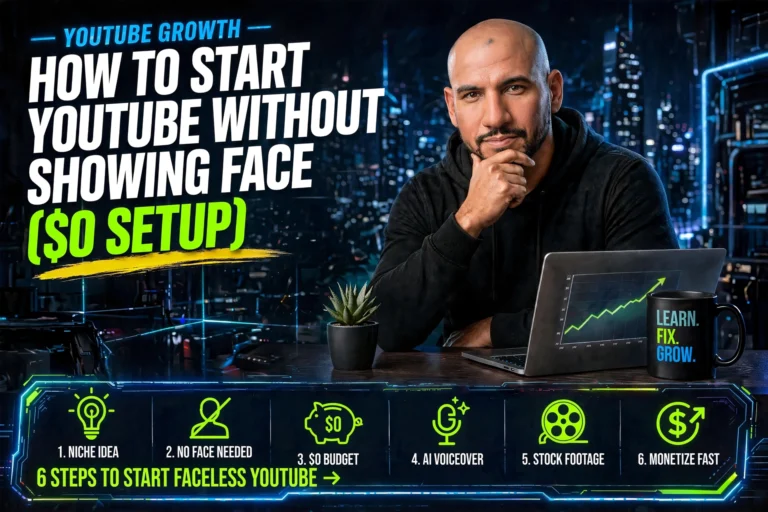
How to Start YouTube Without Showing Your Face
(2026 AI-Powered Guide)
One of YouTube’s biggest secrets: some of its highest-earning channels have never shown a face on screen. Not once.
Channels in personal finance, online business, AI tools, self-improvement, and history pull in thousands to tens of thousands of dollars per month — anonymously, consistently, without a studio, without a camera, and in 2026, without even recording their own voice.
AI has made faceless YouTube easier than it’s ever been. This guide gives you the complete system: the formats that work, the tools that make production fast, and the monetisation path that starts before you hit 1,000 subscribers.
Yes — you can build a profitable YouTube channel without ever showing your face. The top faceless formats in 2026 are AI text-to-video, screen recordings with AI voiceover, stock footage with narration, and AI avatar presenters. Tools like ChatGPT (scripts), ElevenLabs (voice), and Flow or InVideo AI (video assembly) produce a complete video in 2 hours for under $30/month.
- Best niches: personal finance, online business, AI tools, self-improvement, history
- Monetise via affiliate links from video one — before hitting 1,000 subscribers
- AdSense eligibility: 1,000 subs + 4,000 watch hours (typically 3–9 months)
- Top faceless channels earn $5,000–$50,000+/month with no on-camera presence
Why Faceless YouTube Works Better Than Ever in 2026
Three years ago, faceless channels were a workaround — a way for shy creators to participate in a platform built around personality. Today, they’re a legitimate strategic choice, and often a smarter one.
Here’s why the model has flipped:
- AI voiceover is indistinguishable from human narration. ElevenLabs, Murf, and similar tools produce studio-quality narration from text in minutes. The “robotic AI voice” era is over.
- AI video tools assemble footage automatically. Tools like Flow, InVideo AI, and Pictory match your script to relevant stock footage, add captions, and export a finished video — no editing timeline required.
- YouTube’s algorithm rewards watch time, not personality. If your content keeps viewers watching, YouTube promotes it. The algorithm doesn’t care if there’s a face on screen.
- Audiences in high-CPM niches come for information, not entertainment. Someone watching a video about “best affiliate marketing tools” doesn’t need to see your face — they need accurate, helpful information.
The 6 Best Faceless YouTube Formats (And When to Use Each)
Not all faceless formats suit every niche or creator. Here’s how to pick yours.
You write a script (or use ChatGPT to write it), paste it into an AI video tool, and receive a finished video with matched stock footage, captions, transitions, and background music. No editing. No manual assembly.
Best tools: InVideo AI, Pictory, and Flow. Most have free tiers. InVideo AI and Pictory are the most beginner-friendly — you input a topic or script and the tool builds the video automatically.
Best niches for this format: Online business, AI tools, marketing, self-improvement, productivity. Any topic where stock footage exists in abundance and the value is in the information, not the visuals.
Realistic output speed: One 8–10 minute video in under 90 minutes once you have the workflow down.
⏱ 90 mins per video | 🎯 Best for: info nichesRecord your screen — a tutorial, a software walkthrough, a website review, a case study breakdown — and narrate it using an AI voice tool instead of your own voice. This format has extremely high watch time because viewers follow along in real time.
Best tools: OBS (free screen recorder) + ElevenLabs or Murf for voiceover. ElevenLabs free tier gives you 10,000 characters per month — enough for 3–4 complete video narrations.
Best niches: Software tutorials, affiliate marketing education, AI tool reviews, online business how-tos. Any “watch me do this” content.
Why this converts to affiliate income: Viewers watching a software tutorial are already in buying mode. One recommendation with an affiliate link at the right moment earns significantly more per view than passive display advertising.
⏱ 2 hrs per video | 🎯 Best for: tutorials & reviewsWrite a script, source royalty-free stock footage on Pexels or Pixabay (both free), add AI narration using ElevenLabs, assemble in CapCut or DaVinci Resolve. This produces the most polished-looking result and works for any topic where great stock footage exists.
Best niches: History, science, travel, self-improvement, personal finance, business case studies. Any documentary-style content.
CPM note: History and documentary channels typically earn $5–$15 CPM. Personal finance and business earn $15–$40 CPM. Same effort — very different revenue per 1,000 views. Choose your niche with the CPM in mind.
⏱ 3 hrs per video | 🎯 Best for: documentary-styleCreate presentation-style slides in Canva, add smooth transitions and motion, narrate with AI voiceover. This format works particularly well for “listicle” content — “7 things to do before 30,” “5 AI tools that changed my workflow,” “3 mistakes affiliate marketers make.”
Why it performs: High retention rate because viewers expect information to come in clear, structured chunks. Easy to binge. Algorithm-friendly.
Best tools: Canva (free plan sufficient) + ElevenLabs + CapCut for final assembly.
Scalability: Once you have a Canva template, a new video can be produced in under an hour. The fastest format to scale.
⏱ 1 hr per video | 🎯 Best for: list contentCreate a realistic AI avatar that appears on screen as your “host” — speaking your script with lip-synced visuals, gestures, and professional presentation. Tools like HeyGen and Synthesia generate these from text input.
Why this works: Provides the “talking head” format that performs best in certain niches (coaching, education, professional training) without any personal camera exposure. The avatar becomes your on-screen persona.
Cost: HeyGen and Synthesia start at around $24–$29/month. Worth it once you’re generating affiliate income — the format’s higher click-through rate usually pays back the tool cost quickly.
Best niches: Online education, professional development, coaching content, explainer videos.
⏱ 1.5 hrs per video | 🎯 Best for: education nichesRecord your voice only (no video), then layer relevant B-roll footage over the audio track to create a video. Or skip the voice entirely — write a script, use AI narration, add B-roll, export. This is the format used by many large finance and self-improvement channels.
Why it scales: Audio-first is the fastest creative workflow. Write, narrate, cover with relevant footage, done. No visual storytelling to engineer. The B-roll carries the visual interest while the narration carries the content value.
Repurpose potential: Each video also becomes a podcast episode, a blog post, and social media clips. One asset, four channels.
⏱ 2 hrs per video | 🎯 Best for: scaling across formatsThe Complete AI Tool Stack for Faceless YouTube (With Costs)
You don’t need expensive software. Here’s the exact stack that produces professional faceless videos on a minimal budget.
| What It Does | Free Option | Paid Option | Monthly Cost |
|---|---|---|---|
| Script writing | ChatGPT free tier | ChatGPT Plus | $0–$20 |
| AI voiceover | ElevenLabs (10k chars/mo) | ElevenLabs Starter | $0–$5 |
| Video assembly | InVideo AI free plan | InVideo AI Plus / Flow | $0–$25 |
| Stock footage | Pexels, Pixabay (free) | Storyblocks | $0–$15 |
| Thumbnail design | Canva free | Canva Pro | $0–$13 |
| Editing (optional) | CapCut (free) | DaVinci Resolve (free) | $0 |
| AI avatar (optional) | — | HeyGen / Synthesia | $24–$29 |
Realistic total to start: $0 (free tiers only) to $30/month for a capable paid stack. Most creators start free and upgrade individual tools as they start generating income.
The Best Niches for Faceless YouTube in 2026 (Ranked by CPM)
Niche selection determines your income ceiling more than anything else. Two channels with identical view counts can earn 8x different amounts based purely on advertiser demand in their niche.
| Niche | Avg CPM | Affiliate Potential | Competition |
|---|---|---|---|
| Personal Finance | $15–$40 | Very High | High |
| Online Business / Affiliate | $12–$30 | Very High | High |
| AI Tools & Technology | $10–$25 | High | Medium |
| Self-Improvement | $8–$20 | High | High |
| Software Tutorials | $8–$18 | Very High | Medium |
| History / Documentary | $5–$15 | Low | High |
| Health & Wellness | $8–$18 | High | High |
How to Make Money Before You Hit 1,000 Subscribers
Most creators wait for YouTube Partner Program. Smart creators don’t wait.
YouTube AdSense requires 1,000 subscribers and 4,000 watch hours. For a new channel publishing once a week, that’s typically 3–9 months. Waiting that long with no income is the primary reason creators quit.
Here’s how to earn from video one:
Affiliate links in descriptions (starts immediately)
Every tool, course, book, or service you mention in a video gets an affiliate link in the description. Even 200 views on a well-placed affiliate recommendation for a high-ticket product can generate $50–$200 in commissions. With 10 videos doing this, you’re building a passive commission stack before hitting any YouTube threshold.
Sponsored content (starts at 500–1,000 subscribers)
Brands in the AI tools and online business space actively seek small channels with engaged audiences. A channel with 800 highly-targeted subscribers in the affiliate marketing niche is worth more to a relevant brand than a lifestyle channel with 50,000 general subscribers.
Digital products in descriptions
Link your own Gumroad product, prompt pack, template, or mini-course directly in video descriptions. Viewers who watch your full video are your most engaged audience — and the most likely to buy from you specifically. This requires zero subscriber threshold.
The 4 Mistakes That Kill Faceless Channels in Month One
1. Starting without a 5-video batch
Uploading one video and waiting to see what happens kills momentum. Batch your first five videos before publishing any of them. This keeps you consistent regardless of the algorithm’s initial response — and consistency is what the algorithm rewards.
2. Uploading with no SEO intent
YouTube is a search engine. Titles like “my first video” or “passive income tips” with no keyword research don’t exist in the algorithm. Research what people actually type into YouTube search. Your title should be the exact phrase someone searching your topic would use — then add a benefit or hook after it.
3. Ignoring the first 30 seconds
YouTube’s retention signal is heavily weighted toward the first 30 seconds. If viewers click away early, the video gets buried regardless of total watch time. Open with a hook that immediately tells the viewer what they’ll learn and why they should stay — before any introduction, context, or background.
4. Using generic AI output without editing
A script generated by ChatGPT without personalisation sounds exactly like a script generated by ChatGPT. Add your own examples, specific numbers, and genuine opinions. The script is a first draft — not the finished product. The personalisation is what separates channels that grow from channels that stagnate.
Your First 30 Days: The Exact Action Plan
- Day 1: Choose your niche (AI tools, online business, or personal finance recommended). Open a YouTube channel. Set up ChatGPT free and ElevenLabs free.
- Day 2–3: Research 20 keyword-driven video ideas using YouTube search and Google’s “People Also Ask.” Pick the 5 with clearest buyer or high-intent search terms.
- Day 4–10: Write scripts for all 5 videos using ChatGPT. Edit each one — add personal examples, specific numbers, genuine opinions. Generate voiceover with ElevenLabs.
- Day 11–15: Assemble all 5 videos using InVideo AI or Flow. Create 5 thumbnails in Canva. Write keyword-optimised titles and descriptions.
- Day 16: Publish video 1. Add affiliate links to all relevant tools in the description.
- Day 17–30: Publish the remaining 4 videos (one every 3 days). Research and script the next batch of 5. Respond to every comment in the first 48 hours — it signals engagement to the algorithm.
Get the Free AI Affiliate Blueprint That Powers Faceless Income
The exact AI tools, scripts, affiliate offers, and automation setup I use to generate income from YouTube and beyond — free, no purchase required.
⚡ Get Instant Free Access




1 thought on “How to Start YouTube Without Showing Face ($0 Setup)”