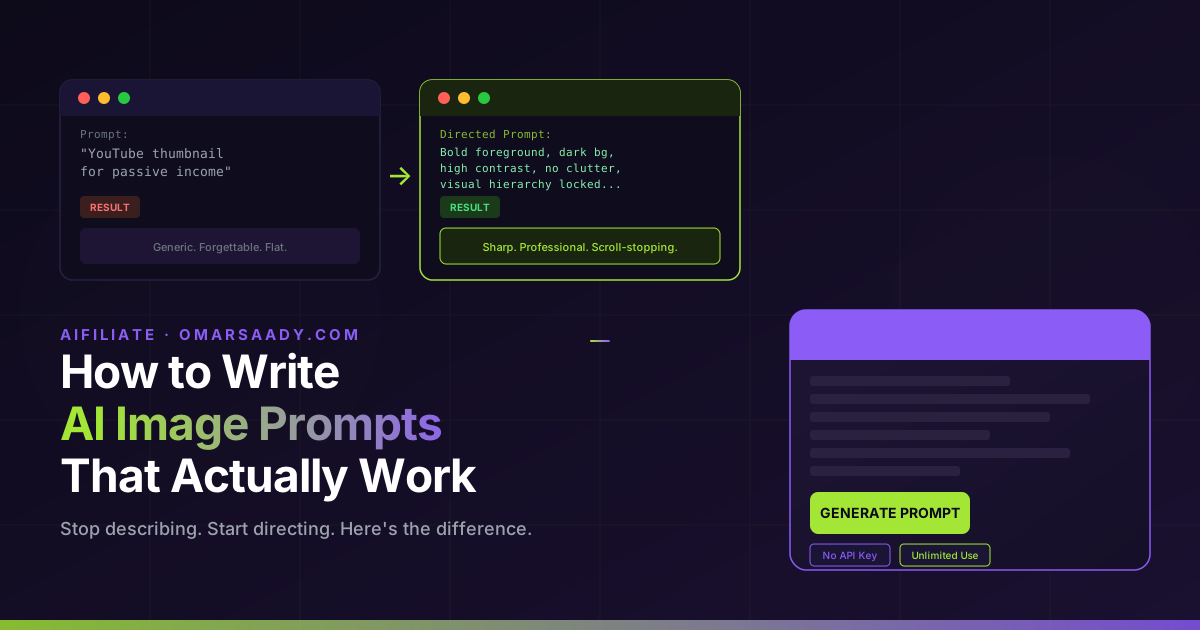
AI Tools, Prompt Writing Prompt: “YouTube thumbnail for passive income” RESULT Generic. Forgettable. Flat. → Directed Prompt: Bold foreground, dark bg, high contrast, no clutter, visual hierarchy locked… RESULT Sharp. Professional.
Scroll-stopping. AIFILIATE · OMARSAADY.COM How to Write AI Image Prompts That Actually Work Stop describing. Start directing. Here’s the difference.
PROMPT ENGINE GENERATE PROMPT No API Key Unlimited Use Left: a vague prompt producing flat, generic results. Right: a directed prompt producing a sharp, professional image — same tool, different instruction structure.
You typed your image idea into ChatGPT. You were specific. You thought you explained it clearly. What came back looked flat. Generic. Like a stock photo from 2009.
You’re not alone. And it’s not your fault.
Most people who struggle with AI image creation are making the same mistake. It has nothing to do with which tool they use. It has everything to do with how they write AI image prompts.
The gap between a bad AI image and a professional-looking one is almost always the prompt — not the model. Once you understand why, the fix becomes obvious.
By the end of this post you’ll know exactly what separates weak prompts from strong ones, a repeatable four-step structure you can use immediately, and how to skip the manual work entirely if you need results fast.
Why Your AI Images Keep Looking Like Everyone Else’s
You’ve probably already tried the usual fixes. You added more words. You Googled “best AI image prompt examples.” You copied a template from Reddit or downloaded a free prompt pack.
Some of them worked once — for that exact image, in that exact style. The moment you needed something different, you were back to square one.
Here’s why those approaches fail:
❌ What most people try
Copying free prompt lists built for someone else’s brand, style, and use case. The result looks like you’re borrowing someone else’s visual identity.
✓ What actually works
A structured prompt built around your specific image type, your brand context, and a clear visual direction the AI can execute.
Most prompt engineering tutorials also steer you wrong. They teach concepts like negative prompting, sampling steps, and style tokens — useful in Midjourney or Stable Diffusion, but mismatched for ChatGPT-based image creation. You end up applying advice built for a different tool.
The real problem is simpler than that. Adding more words to a vague prompt just produces a longer vague prompt. The issue isn’t length. It’s structure.
According to OpenAI’s research on image generation, the single biggest factor in output quality is prompt specificity — not model capability. The model responds to what it’s told to think about.
If you give it a vague instruction, it fills the gap with its own defaults. Those defaults look generic because they’re shared across millions of prompts.

What Makes an AI Image Prompt Actually Work?
Here is the insight that changes everything:
A good AI image prompt isn’t a description. It’s a direction.
When you describe an image, you tell the AI what you see. When you direct an image, you tell the AI how to build it — the structure, the visual hierarchy, the lighting, the composition, the emotional tone, and what to protect or avoid.
Descriptions produce generic images. Directions produce intentional ones.
Think of it like this. If you hired a photographer and said “take a photo of a coffee shop that feels warm and professional,” you’d get something acceptable.
If you said “low angle near the counter, warm window light from the left, shallow depth of field, clean negative space on the right for headline text, no cluttered shelves in background” — you’d get something you could actually use in a campaign.
That’s the gap most people don’t know exists. They’re telling the AI what — not how.
The challenge is that most of us don’t carry that vocabulary. We’re not photographers or graphic designers. We don’t naturally think in terms of visual hierarchy, compositional balance, or light direction.
That’s exactly what Easy Image Prompt Pro is built to solve. Instead of you learning the vocabulary of visual direction, the tool applies it for you. You type what you want in plain English.
It structures that idea into a prompt that tells ChatGPT how to think like a visual director.
The result is a finished, detailed image prompt — built around your specific idea — ready to paste into any AI image tool.
How to Turn a Simple Idea Into a Professional AI Image Prompt
You don’t need to become a prompt engineer. You need a repeatable system. Here’s the four-step structure that consistently produces stronger results — whether you apply it manually or use a tool to automate it.
1- Start with the image type, not the image itself
Name what you’re making before describing anything. A YouTube thumbnail, a Pinterest pin, a Facebook ad image, a sales page header — each has a different visual language: aspect ratio, text requirements, visual priorities.
The AI needs that context before anything else.
2- Define the compositional intent
Where should the viewer’s eye land first? Is there a focal point? Does the image need negative space for a text overlay? What belongs in the foreground vs. background? Even rough answers transform a vague prompt into a structural one.
3 Specify what you want the AI to avoid
This is where most prompts fall apart. Generic AI images happen because no one told the AI what not to do. Say it plainly: no watermarks, no distorted faces, no cluttered backgrounds, no cheap gradient effects. Constraints are as important as descriptions.
4 Add atmosphere, not just an aesthetic label
“Modern and clean” is a style label. “High contrast, dark background, electric color accents, sharp edges, no soft or dreamy effects” is a direction the AI can execute. The second version leaves no room for generic interpretation. If doing this manually every time sounds like a lot of work — it is. That’s what the shortcut below handles.
Easy Image Prompt Pro automates all four of these steps. You answer one question — “I want to create an image prompt to create: ___” — click once, and the system builds out the full structured prompt for you. No API key. No credits. No learning curve. Paste the result into ChatGPT and you’re done.
For a deeper look at how AI image generation actually interprets prompt structure, this Hugging Face breakdown of diffusion model behavior explains exactly why compositional instructions outperform descriptive ones — the core insight behind this whole approach.

What to Realistically Expect
Switching from a one-line vague prompt to a directed structural prompt doesn’t just produce slightly better images. For most people, it changes the category of image they’re able to produce.
Before
“YouTube thumbnail for a video about passive income” → Generic yellow background, stock-photo money graphic, totally forgettable. Indistinguishable from 10,000 other thumbnails.
After
A directed prompt specifying your video title context, thumbnail composition best practices, bold foreground contrast, no background clutter, and visual hierarchy designed to stop someone mid-scroll. A result you can actually publish.
74,000+
Total sales by creator Mark Hess
4.9/5
Average star rating across products
0.02%
Refund rate across all products
Buyers consistently report the same pattern: results that “feel expert-written even if you’re brand new.” Several have called it their most-used content tool. That’s not coincidence — it’s what happens when the structural work is handled for you, and you can focus entirely on the idea.
There’s no guarantee your first prompt will produce something perfect. But the gap between starting point and polished result gets dramatically smaller when you’re not writing blind.
🔗 Recommended Tool
Stop writing prompts from scratch every time.
Easy Image Prompt Pro generates the full structured prompt for you. Type your image idea, click once, paste into ChatGPT. Clean, professional, repeatable — for every image your business needs.See How It Works →
No API KeyUnlimited UseOne-Time PriceInstant Access
The Bottom Line on AI Image Prompting
The reason most AI images look the same is that most people are prompting the same way — vaguely. They describe what they want and let the AI fill in the gaps. The AI fills them with defaults. Defaults look generic.
People who consistently get clean, professional, intentional images aren’t better designers. They’ve learned to direct the AI instead of describe to it. They tell it how to think about the image — not just what the image is of.
If you want to start creating that way without memorising the full mechanics from scratch, take a look at what Easy Image Prompt Pro actually does. The workflow is simpler than you’d expect, and the jump in output quality is hard to miss once you see it.
Frequently Asked Questions
Do I need design experience to write good AI image prompts?
No. The gap between a weak AI image and a professional-looking one comes down to prompt structure, not design knowledge. Once you direct the AI — compositing, lighting, hierarchy — rather than just describing the image, results improve dramatically. No design background required. Can I use these prompts with ChatGPT’s free version?
Yes. The prompting techniques described here — and prompts generated by Easy Image Prompt Pro — work with ChatGPT’s standard image creation capabilities. No special API access or paid tier is required for basic use, though some image features may vary by plan. How is a prompt creation engine different from a prompt list?
A prompt list gives you fixed examples built around someone else’s specific ideas. An engine generates fresh, custom prompts around your exact idea each time. Practical difference: a list runs out and rarely fits your use case. An engine like Easy Image Prompt Pro keeps producing — you bring the idea, the system builds the prompt structure around it. What is the difference between describing and directing an AI image?
Describing tells the AI what you see — the subject, the general look. Directing tells it how to build the image — the compositional structure, lighting approach, visual hierarchy, and what to avoid. Descriptions produce generic images. Directions produce intentional, professional-looking ones. What is Easy Image Prompt Pro and how does it work?
Easy Image Prompt Pro is a prompt creation engine by Mark Hess. You type your image idea in plain English, click once, and it generates a fully structured Prompt Creator Prompt. Paste that into ChatGPT, which builds a finished, expert-level image prompt ready to use. No API key, no credits, no learning curve. One-time purchase, unlimited use.
Keep Reading
AI Tools Best Free AI Tools for Affiliate Marketers in 2025 Pinterest Marketing How to Create Pinterest Pins That Actually Get Clicks
Disclosure: This post contains affiliate links. If you purchase through a link on this page, I may earn a commission at no extra cost to you. I only recommend tools I’ve personally reviewed and would use myself